Essential Information Technology Questions Every Student Should Learn
Published: 6 Feb 2026
Information Technology (IT) is essential in today’s world. IT systems operate in schools and businesses. Many individuals pursue IT expertise to master computers, develop skills, or prepare for exams and interviews.
Whether you are a student, newcomer, or job applicant, these IT questions can grow your career. This article provides clear, straightforward answers to common IT questions. Each response is practical and easy to understand.
Ready to build your IT knowledge step by step? Share your questions or start reading to improve your IT skills today!
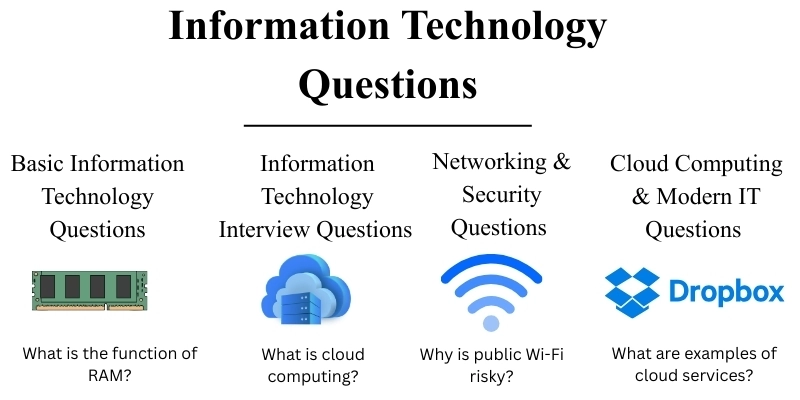
Basic Information Technology Questions
This section features essential IT questions often asked by students and beginners. These questions are commonly asked in exams and IT interviews. Each answer is short and clear.
1. What is an operating system?
An operating system (OS) is the central software that allows all your computer’s hardware and software to work together. It manages resources, runs programs, and enables user interaction with the device. Popular examples include Windows, macOS, Linux, and Android.
The OS directly controls important tasks such as memory management, file handling, and input/output operations. By providing the best interface between the user and hardware, it is crucial for daily computer use.
2. What does BIOS stand for?
BIOS stands for Basic Input/Output System. Have you ever wondered what happens when you turn on your computer? It is firmware stored in a computer’s motherboard and plays a key role in booting up the system.
When the system powers on, the BIOS initializes and checks the hardware components (like the CPU, RAM, and storage devices) to ensure they’re working properly.
It also allows you to change settings such as the boot order or system clock through a configuration menu. While modern systems are shifting to UEFI (Unified Extensible Firmware Interface), which offers more advanced features and a graphical interface, the BIOS still holds a foundational role in system setup and is simpler in design compared to UEFI.
3. What is the function of RAM?
RAM (Random Access Memory) is computer memory that temporarily stores data in use. It allows the CPU to access data quickly and boosting program performance. Without enough RAM, the system slows down as it relies on a slower hard drive or SSD.
You can only work on a few things at once by thinking of RAM like your desk. When you need more information, you go to your filing cabinet, which is your hard drive. Remember, RAM is volatile, so your data will be lost if you turn off your computer.
4. What is the difference between hardware and software?
The terms hardware and software refer to the physical and digital components of a computer.
- When we say hardware, we mean the parts you can actually touch, like the CPU, monitor, keyboard, and hard drive.
- Software is all the programs and apps that tell your hardware what to do. Think of your operating system (like Windows), your favorite browser (like Google Chrome), or tools that keep things safe (like Antivirus software).
5. What is a computer network?
A computer network is a group of devices and software that connect to share and communicate. Devices can be computers, servers, printers, or other hardware, and network software helps manage this communication.
With a network, you can share files, internet access, and other resources between your devices.
There are different types of networks:
- LAN (Local Area Network): You might see this as the small network in your home or office.
- WAN (Wide Area Network): You experience this when you connect to networks that range over large areas, like the Internet.
Knowing about computer networks is important for communication today, especially for businesses and remote work.
6. What is information technology?
Information Technology (IT) is the use of computers, networks, software, and databases, such as email systems, cloud storage solutions, and point-of-sale systems, to process, store, and transmit information.
IT supports most modern businesses and personal technologies, helping organizations manage data, improve efficiency, and communicate more effectively.
The scope of IT includes everything from:
- Hardware: The physical components of computers and devices, such as laptops, servers, and smartphones.
- Software: Applications that allow you to perform tasks, such as word processors, web browsers, and accounting programs.
- Networking: Connecting computers and devices together, such as using Wi-Fi routers in offices and homes.
- Cybersecurity: Protecting data and systems from unauthorized access, such as using antivirus software, firewalls, and two-factor authentication.
Businesses of all sizes rely on IT to work from small startups to large corporations.
Information Technology Interview Questions
This section will help you prepare to apply for IT jobs. These questions check how well you use technology, solve problems, and communicate.
During IT job interviews, many companies ask these kinds of questions.
Technical IT Interview Questions
7. What is your troubleshooting process?
I follow a proven, systematic approach to quickly resolve IT issues:
- Identify the problem: I collect key details from the user about the issue and device.
- I replicate the issue to fully understand its impact.
- I isolate the cause by methodically checking hardware, software, and the network.
- I implement solutions and verify if the issue is resolved.
If the problem persists after these initial steps, I escalate by using advanced monitoring tools or consulting with experienced experts to gain deeper insight.
8. What is cloud computing?
Cloud computing enables individuals and businesses to access and store data, and run applications over the internet rather than relying on local computers or physical servers.
Services like Google Drive, Amazon Web Services (AWS), and Microsoft Azure provide reliable storage and computing power without the need for physical devices.
The major benefits of cloud computing include:
- Cost-efficiency: Pay only for what you use so you get more value for your investment.
- Flexibility: Securely access and scale resources and applications globally to match changing business needs.
- Collaboration: Tools like Google Docs or Microsoft Office 365 help teams easily work together, even when they’re apart.
Cloud computing has transformed business data and IT management.
Troubleshooting Questions
9. How do you fix Wi-Fi issues?
To fix Wi-Fi issues, I follow these four steps:
- Check the router: Ensure it’s powered on and connected to the internet. Sometimes, simply restarting the router can solve the issue.
- Check for Interference: Make sure nothing is blocking the Wi-Fi signal, like walls or other devices.
- Reconnect the device: Disconnect and reconnect the device to the network.
- Reset network settings: If it still doesn’t work, reset the device’s network or check for updates on the router.
Contact your internet provider if you still have issues.
10. What do you do if a computer is slow?
When dealing with a slow computer, I first diagnose the issues with the following steps:
- Check Task Manager for high CPU, memory, or disk use.
- Close unnecessary background programs.
- Scan for malware with antivirus software.
- Clear temporary files to free disk space.
If it remains slow, add more RAM or upgrade to an SSD.
Behavioral IT Interview Questions
11. How do you explain technical issues to non-technical users?
When explaining technical issues to non-technical users, I keep explanations simple and clear. I avoid jargon and use terms they understand.
For example, instead of using the technical term “network configuration,” I explain it by saying, “Your internet isn’t working because the router can’t find the right network.” I also use analogies, such as describing the router as a postman who can’t find an address, to make the concept clearer.
12. How do you handle pressure at work?
I handle pressure by staying organized, breaking down large tasks into manageable steps and prioritizing what needs to be done. I communicate clearly with my team and use time management techniques to stay productive and manage stress.
Networking & Security Questions
Networking and security are important components of Information Technology. Many IT interviews involve questions in this area. Let’s learn them in an easy manner.
13. What is the difference between HTTP and HTTPS?
Have you ever wondered why some websites start with HTTP and others with HTTPS? The key difference between HTTP (HyperText Transfer Protocol) and HTTPS (HyperText Transfer Protocol Secure) is encryption.
HTTPS secures data between the browser and server. HTTP does not encrypt data.
- Data transmitted over HTTP remains in plaintext, so it becomes vulnerable to interception by hackers.
- HTTPS uses the SSL/TLS protocols to secure the connection. It encrypts information like login credentials and financial transactions.
HTTPS is crucial for data security on websites, especially e-commerce or banking. Modern browsers show a padlock icon for secure HTTPS connections.
14. Why is public Wi-Fi risky?
Public Wi-Fi in places like cafes or airports often lacks encryption, which allows hackers to intercept your data.
Your sensitive information such as credit card numbers or personal messages, is at serious risk of exposure on these networks. Take action immediately and always use a VPN (Virtual Private Network) on public Wi-Fi and never perform sensitive transactions like online shopping or banking when using these networks.
15. What is a firewall?
A firewall is a network security device. It monitors and filters packets between your computer and the network. It acts as a barrier between trusted internal networks and untrusted external networks. This prevents unauthorized access to your system.
Firewalls can be software on your device or hardware like a separate device or router. They are essential for network security. Firewalls block harmful traffic such as malware or hackers.
16. What is a vulnerability in IT security?
Identify and eliminate weaknesses in your IT systems before attackers can exploit them. Any weakness provides a clear opportunity for unauthorized access and dangerous attacks.
Act immediately to address issues in software, hardware, or network infrastructure. Outdated software, insecure operating systems, device default security settings, and incorrect firewall rules are all entry points that attackers seize without hesitation.
Immediately patch and audit systems to address weaknesses before attackers do.
17. What is the difference between threat and risk?
A threat is any potential danger that could exploit a vulnerability in your system. In contrast, a risk is the chance that a threat will successfully exploit a vulnerability and cause harm, taking into account both the likelihood and impact of such an event.
In IT security, risk management has three main steps: find possible dangers, figure out how likely they are, and take steps to prevent damage.
For example, a hacker attempting to access a company’s confidential database by exploiting weak password protocols could lead to unauthorized data extraction, resulting in data loss and reputational risk.
Cloud Computing & Modern IT Questions
Cloud computing has become an emerging aspect of information technology. Many businesses now adopt cloud services.
Therefore, interviewers frequently ask cloud-related questions in IT interviews.
18. What are examples of cloud services?
There are various cloud services available, each serving different needs for businesses and individuals:
- To access your files easily from anywhere, use cloud storage services such as Google Drive, Dropbox, and OneDrive. These allow you to store and retrieve files from any device.
- If your needs are more advanced, such as building digital solutions, cloud platforms like AWS, Azure, and Google Cloud offer developers and businesses computing, storage, and networking services.
- To improve productivity or manage customer relations, use cloud software such as Office 365 and Salesforce to access essential tools over the cloud.
Cloud services provide rapid growth, affordability, and remote access, making them beneficial to any business. Automatic upgrades also reduce IT maintenance.
19. What are the benefits of cloud computing?
Cloud computing empowers organizations with exceptional scalability, significant cost savings, greater flexibility, and convenient remote access.
- Scalability: Seamlessly enables resources to be scaled up or down based on demand.
- Cost savings: Enables reduction of infrastructure costs through pay-as-you-go models.
- Flexibility: Enjoy seamless access to data and apps from anywhere.
- Collaboration: Empowers productive, real-time teamwork on platforms like Google Drive and Office 365.
Information Technology MCQs & Quiz Questions
This section helps you test your IT knowledge. These IT MCQs are common in quizzes, exams, and online tests. Read each question carefully and check the answer.
1. ROM stands for:
A) Random Output Memory
B) Read Only Memory
C) Rapid Open Memory
D) Remote Output Memory
Correct Answer:
✅ B) Read Only Memory
Simple Explanation:
A ROM stores important data permanently and supports the computer during startup.
2. URL stands for:
A) Uniform Resource Locator
B) Universal Record Link
C) Unique Resource Line
D) Uniform Remote Location
Correct Answer:
✅ A) Uniform Resource Locator
Simple Explanation:
A URL is the address of a website and helps browsers find web pages.
3. Which device is used to connect networks?
A) Printer
B) Scanner
C) Router
D) Monitor
Correct Answer:
✅ C) Router
Simple Explanation:
A router connects networks and allows devices to access the internet.
4. Which of the following is an operating system?
A) MS Word
B) Google Chrome
C) Windows
D) Photoshop
Correct Answer:
✅ C) Windows
Simple Explanation:
A Windows system controls the computer and allows users to run applications.
5. Which one is a cloud service?
A) USB Drive
B) Hard Disk
C) Google Drive
D) DVD
Correct Answer:
✅ C) Google Drive
Simple Explanation:
Store data online in Google Drive to access from anywhere.
6. Which device is known as the brain of the computer?
A) Keyboard
B) Monitor
C) CPU
D) Mouse
Correct Answer:
✅ C) CPU
Simple Explanation:
Process instructions with the CPU to control the computer’s operations.
7. Which memory is used to store data temporarily?
A) ROM
B) Hard Disk
C) RAM
D) DVD
Correct Answer:
✅ C) RAM
Simple Explanation:
RAM stores data temporarily. It helps programs run faster.
8. Which one is an input device?
A) Printer
B) Speaker
C) Monitor
D) Keyboard
Correct Answer:
✅ D) Keyboard
Simple Explanation:
A keyboard is used to enter data into a computer.
9. What does Wi-Fi allow devices to do?
A) Print documents
B) Store data
C) Connect to the internet wirelessly
D) Scan files
Correct Answer:
✅ C) Connect to the internet wirelessly
Simple Explanation:
Wi-Fi connects devices to the internet without using cables.
10. Which software helps protect a computer from viruses?
A) Operating System
B) Antivirus
C) Web Browser
D) Media Player
Correct Answer:
✅ B) Antivirus
Simple Explanation:
Antivirus software protects computers from harmful programs.
Conclusion
This article covered important information technology questions in a clear and simple way. You learned the basics of IT: operating systems, hardware, software, networking, and security. You also explored cloud computing, interview questions, and MCQs.
Each section focuses on real-world applications. Examples simplified technical concepts and made them easier to comprehend. This approach helps you recall information more effectively and apply it with confidence.
This guide is a valuable resource for anyone preparing for IT exams, interviews, or seeking to strengthen skills for career opportunities. Practicing these questions sharpens your readiness for success.
Continue building your IT foundation to unlock greater career prospects and professional growth.

- Be Respectful
- Stay Relevant
- Stay Positive
- True Feedback
- Encourage Discussion
- Avoid Spamming
- No Fake News
- Don't Copy-Paste
- No Personal Attacks
- Be Respectful
- Stay Relevant
- Stay Positive
- True Feedback
- Encourage Discussion
- Avoid Spamming
- No Fake News
- Don't Copy-Paste
- No Personal Attacks
