Difference Between Hardware and Software: Key Facts You Should Know
Published: 10 Aug 2026
Are you confused about the difference between hardware and software when learning computer basics? Both are essential parts of a digital device, but they perform different functions.
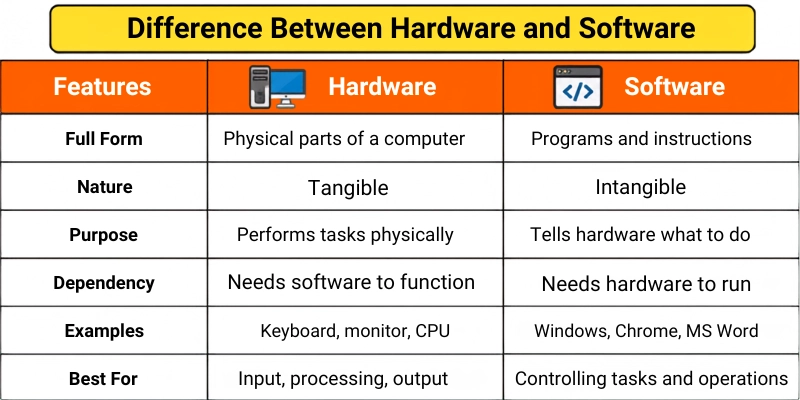
Hardware refers to physical components that you can see and touch, including the keyboard, monitor, processor, and hard drive. Software refers to programs and digital instructions, such as operating systems, web browsers, and mobile apps.
Understanding how they work together can help you identify computer problems, compare devices, and make better decisions about upgrades, applications, and technology.
Quick Answer
The main difference between hardware and software is that hardware is the physical part of a computer, while software is the collection of programs and instructions that run on it.
Examples of hardware include a keyboard, monitor, processor, hard drive, and mouse. Examples of software include Windows, Microsoft Word, Google Chrome, mobile applications, and computer games.
Hardware cannot perform useful tasks without software, and software cannot run without compatible hardware.
What Is Hardware?
Hardware refers to all the physical parts of a computer or electronic device that you can see and touch.
These components work together to receive input, process data, store information, and produce output.
For example, when you type on a keyboard, the keyboard sends information to the computer. The processor handles that information, and the monitor displays the result.
Examples of computer hardware include:
- Keyboard
- Mouse
- Monitor
- Processor
- Motherboard
- RAM
- Hard drive
- Solid-state drive
- Printer
- Scanner
- Speakers
- Graphics card
Types of Hardware
Hardware can be divided into several categories.
1. Input Hardware
Input devices allow users to enter data into a computer.
Examples include:
- Keyboard
- Mouse
- Microphone
- Scanner
- Webcam
- Touchscreen
2. Output Hardware
Output devices present information to the user.
Examples include:
- Monitor
- Printer
- Speakers
- Headphones
- Projector
3. Processing Hardware
Processing hardware handles instructions and performs calculations.
Examples include:
- Central processing unit
- Graphics processing unit
- Motherboard
4. Storage Hardware
Storage devices save files, programs, and operating system data.
Examples include:
- Hard disk drive
- Solid-state drive
- USB flash drive
- Memory card
- External hard drive
What Is Software?
Software is a collection of programs, data, and instructions that tells computer hardware how to perform tasks.
Unlike hardware, software cannot be physically touched. It exists digitally and is stored on devices such as hard drives, SSDs, memory cards, and cloud servers.
For example, when you open a web browser, the software sends instructions to the processor, RAM, monitor, keyboard, and network hardware.
Examples of software include:
- Windows
- macOS
- Android
- Microsoft Word
- Google Chrome
- Adobe Photoshop
- Computer games
- Antivirus programs
- Video-editing applications
Types of Software
Software is commonly divided into the following categories.
1. System Software
System software manages computer hardware and provides a platform for other programs.
Examples include:
- Operating systems
- Device drivers
- Firmware
- System utilities
2. Application Software
Application software helps users perform specific tasks.
Examples include:
- Word processors
- Web browsers
- Media players
- Accounting software
- Design applications
- Mobile apps
3. Programming Software
Programming software helps developers create and test programs.
Examples include:
- Code editors
- Compilers
- Debuggers
- Integrated development environments
Hardware vs Software Comparison Table
| Feature | Hardware | Software |
|---|---|---|
| Definition | Physical parts of a device | Programs and digital instructions |
| Physical form | Can be seen and touched | Cannot be physically touched |
| Main purpose | Performs physical operations | Controls and instructs hardware |
| Creation | Manufactured using physical materials | Developed using programming languages |
| Examples | Keyboard, CPU, monitor, SSD | Windows, Chrome, Word, apps |
| Damage | Can break, wear out, or overheat | Can become corrupted or infected |
| Replacement | Requires physical repair or replacement | Can usually be reinstalled or updated |
| Development process | Designed and manufactured | Written, tested, and programmed |
| Virus risk | Not directly infected like software | Can be affected by malware |
| Storage | Provides storage space | Is stored on hardware |
Key Differences Between Hardware and Software
Hardware and software work together, but they differ in their form, purpose, creation, maintenance, and operation.
1. Hardware Is Physical, While Software Is Digital
The most important difference between hardware and software is their physical form.
Hardware includes components that you can see and touch. A monitor, keyboard, processor, mouse, and hard drive are physical objects.
Software consists of digital instructions and programs. You can use software through a screen, but you cannot physically touch the program itself.
For example, a laptop is hardware, while the Windows operating system installed on it is software.
2. Hardware Performs Tasks, While Software Gives Instructions
Hardware carries out physical and electronic operations.
For example:
- A keyboard receives input.
- A processor performs calculations.
- A monitor displays results.
- A hard drive stores information.
Software gives instructions to these components.
When you click the print button in a document program, the software sends instructions to the printer hardware. The printer then produces the physical document.
3. Hardware Is Manufactured, While Software Is Developed
Hardware is manufactured using physical materials and electronic components.
Companies use metals, plastics, circuits, chips, and other materials to produce computers, smartphones, and accessories.
Software is developed by programmers. They use programming languages, frameworks, and development tools to create applications and operating systems.
For example, a smartphone is manufactured in a factory, while the applications installed on it are created through coding.
4. Hardware Can Wear Out Physically
Hardware components may become damaged or stop working because of:
- Heat
- Dust
- Water
- Physical impact
- Electrical problems
- Long-term use
For example, a keyboard key may stop working, a hard drive may fail, or a laptop screen may crack.
Software does not wear out physically. However, it may become outdated, corrupted, incompatible, or affected by errors.
5. Software Can Be Corrupted or Infected
Software may be affected by:
- Viruses
- Malware
- Damaged files
- Coding errors
- Failed updates
- Compatibility problems
Hardware does not normally become infected by a computer virus in the same way.
However, malicious software can control hardware, reduce device performance, damage stored data, or cause overheating by overusing system resources.
6. Hardware Requires Physical Replacement
When hardware becomes damaged, it may need to be repaired or physically replaced.
For example, a failed RAM module may need to be removed and replaced with a new one.
Software problems can often be fixed by:
- Restarting the program
- Updating it
- Reinstalling it
- Changing settings
- Removing malware
- Restoring a backup
This usually makes software easier to replace than hardware.
7. Hardware Upgrades Are Physical
Upgrading hardware requires installing or replacing a physical component.
Examples include:
- Adding more RAM
- Installing a larger SSD
- Replacing the graphics card
- Buying a new monitor
- Upgrading the processor
Software upgrades are normally completed digitally.
For example, you may download a newer application version or install an operating system update.
8. Software Is Easier to Copy
Software can usually be copied, downloaded, transferred, or installed on another compatible device.
However, licences and copyright rules may limit how many devices can legally use it.
Hardware cannot be copied digitally. Producing another keyboard, processor, or monitor requires physical materials and manufacturing.
9. Hardware Takes Up Physical Space
Hardware occupies physical space.
A desktop computer, monitor, printer, keyboard, and other devices need room on a desk or inside a computer case.
Software does not occupy physical space in the same way. It uses digital storage space on a hard drive, SSD, memory card, or cloud server.
For example, a video-editing program may use several gigabytes of storage, but it has no physical size that you can measure with a ruler.
10. Hardware and Software Have Different Lifespans
Hardware may continue working for several years, but its performance can become limited as newer technology appears.
Software can also become outdated when developers stop providing:
- Security updates
- New features
- Compatibility support
- Bug fixes
A computer may still have working hardware but become unable to run modern software efficiently.
Similarly, new software may require more powerful hardware.
Similarities Between Hardware and Software
Although hardware and software are different, they also share some important similarities.
1. Both Are Essential
A computer needs hardware to perform operations and software to provide instructions.
2. Both Work Together
Software controls hardware, while hardware runs and displays the software.
3. Both Can Be Upgraded
Hardware can be physically replaced, while software can be updated or reinstalled.
4. Both Can Develop Problems
Hardware can become damaged, while software can become corrupted, outdated, or infected.
5. Both Affect Performance
Weak hardware and poorly optimized software can both make a device slow.
6. Both Have Different Types
Hardware includes input, output, processing, and storage devices. Software includes system, application, and programming software.
When Should You Upgrade Hardware?
You may need to upgrade hardware when:
- Your computer is too slow for modern programs.
- You do not have enough storage.
- Your device frequently overheats.
- Games have low graphics performance.
- RAM is insufficient for multitasking.
- A physical component is damaged.
- New software requires better specifications.
Adding more RAM or replacing a hard drive with an SSD can improve the performance of some computers.
However, you should check compatibility before buying a new component.
When Should You Update Software?
You should update software when:
- A security update becomes available.
- The application frequently crashes.
- New features are required.
- The software has compatibility problems.
- Bugs affect normal use.
- The current version is no longer supported.
Regular updates can improve security and performance, but important data should be backed up before major operating system updates.
Which One Is Better: Hardware or Software?
Hardware and software serve different purposes, so one is not better than the other.
Hardware provides the physical components required to process, store, display, and transfer information. Software provides the instructions that control these components.
A powerful computer with poor software may not work efficiently. Similarly, advanced software cannot run properly on incompatible or weak hardware.
The best performance comes from using compatible, updated, and well-maintained hardware and software together.
Tips for Using Hardware and Software and Mistakes to Avoid
Follow these simple tips to protect your device and avoid common problems.
Tips
- Keep software and drivers updated.
- Clean hardware carefully and regularly.
- Check system requirements before installing software.
- Back up important files before major updates.
- Use trusted antivirus and security tools.
- Upgrade hardware based on your actual needs.
Mistakes to Avoid
- Do not download software from untrusted websites.
- Avoid forcing incompatible software onto a device.
- Do not open or repair hardware without proper knowledge.
- Never ignore overheating or unusual hardware noises.
- Avoid turning off a device during important updates.
- Do not assume every slow computer needs new hardware.
Conclusion
So guys, in this article, we’ve covered the difference between hardware and software in detail. Hardware includes the physical parts of a device, while software includes the programs and instructions that control them.
I recommend checking both hardware specifications and software requirements before buying or upgrading a computer. Avoid assuming that every slow device needs new hardware because outdated or poorly optimized software may also cause performance problems.
Review your device today, and explore our other beginner-friendly technology guides to improve your computer knowledge.




- Be Respectful
- Stay Relevant
- Stay Positive
- True Feedback
- Encourage Discussion
- Avoid Spamming
- No Fake News
- Don't Copy-Paste
- No Personal Attacks
- Be Respectful
- Stay Relevant
- Stay Positive
- True Feedback
- Encourage Discussion
- Avoid Spamming
- No Fake News
- Don't Copy-Paste
- No Personal Attacks
