Difference Between RAM and ROM: What Most Beginners Get Wrong
Published: 3 Aug 2026
Every time you turn on a computer, open an application, or switch between browser tabs, different types of memory work together in the background.
Understanding the difference between RAM and ROM explains how devices start, process information, and keep essential instructions safe. RAM provides temporary working space for programs, while ROM stores information that remains available even after shutdown.
Although both are called memory, they differ in speed, purpose, data retention, capacity, and accessibility.
This guide compares RAM and ROM using simple explanations and practical examples.
Quick Answer
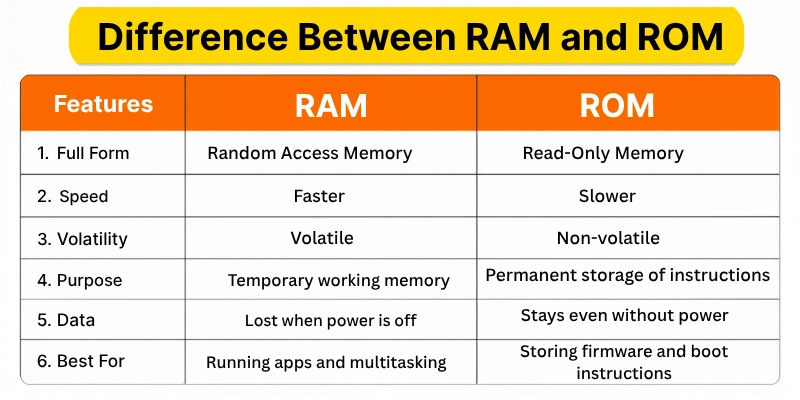
The main difference between RAM and ROM is that RAM stores temporary data, while ROM stores permanent instructions.
RAM loses its data when the device is turned off because it is volatile memory. ROM keeps its information even without power because it is non-volatile memory.
RAM helps programs run smoothly and supports multitasking. ROM mainly stores firmware and startup instructions required to boot and operate the device.
What Is RAM?
RAM stands for Random Access Memory. It is a temporary memory that stores the data and instructions a computer, smartphone, or another electronic device is currently using.
When you open a browser, application, game, document, or video, the required data is loaded into RAM. This allows the processor to access that information quickly.
For example, when you open multiple browser tabs, each tab uses a portion of the available RAM. If your device has more RAM, it can usually handle more programs at the same time without slowing down.
RAM is volatile memory. This means all the information stored in RAM disappears when you turn off or restart the device.
Common Types of RAM
The two main types of RAM are:
- DRAM: Commonly used as the main memory in computers and laptops.
- SRAM: Faster and more expensive memory commonly used in processor cache.
Modern computers may use DDR4 or DDR5 RAM, while smartphones use memory types such as LPDDR4X or LPDDR5.
What Is ROM?
ROM stands for Read-Only Memory. It is a type of non-volatile memory that stores important instructions and data required for a device to start and operate.
Unlike RAM, ROM keeps its information when the device is turned off.
ROM commonly stores firmware. Firmware is software built into hardware that controls basic device functions.
For example, a computer uses firmware stored in non-volatile memory to begin the startup process before the operating system loads.
Traditional ROM could only be read and could not easily be changed. However, many modern ROM types can be updated or rewritten using special methods.
Common Types of ROM
Common types of ROM include:
- Mask ROM: Programmed during manufacturing and cannot normally be changed.
- PROM: Can be programmed once after manufacturing.
- EPROM: Can be erased using ultraviolet light and programmed again.
- EEPROM: Can be erased and rewritten electronically.
- Flash memory: A modern form of non-volatile memory used for firmware and storage.
RAM vs ROM Comparison Table
| Feature | RAM | ROM |
|---|---|---|
| Full form | Random Access Memory | Read-Only Memory |
| Main purpose | Stores currently used data | Stores permanent instructions |
| Memory type | Volatile | Non-volatile |
| Data after power off | Data is lost | Data remains stored |
| Speed | Usually faster | Usually slower than RAM |
| Read and write access | Frequently read and written | Mainly read; writing is limited |
| Role in a device | Runs programs and supports multitasking | Stores firmware and startup instructions |
| Storage capacity | Usually larger | Usually smaller for firmware |
| User upgrade | Often upgradeable in computers | Usually built into the device |
| Common examples | DRAM, SRAM, DDR4, DDR5 | PROM, EPROM, EEPROM, Flash ROM |
Key Differences Between RAM and ROM
RAM and ROM are both forms of memory, but they differ in their purpose, speed, data retention, access method, and use. Here are the major differences between RAM and ROM.
1. RAM Stores Temporary Data, While ROM Stores Permanent Instructions
The most important difference between RAM and ROM is the type of information they store.
RAM temporarily stores the data a device is actively using. This may include open applications, browser tabs, documents, games, videos, and background processes.
For example, when you open Microsoft Word, part of the program and your active document are loaded into RAM.
ROM stores instructions that the device needs for basic operation. These instructions normally remain unchanged for long periods.
For example, firmware stored in ROM or flash memory helps a computer identify hardware and begin the startup process.
2. RAM Is Volatile, While ROM Is Non-Volatile
RAM is volatile memory. It requires continuous electrical power to retain its data.
When you shut down or restart your computer, the data stored in RAM is removed. This is why an unsaved document may be lost if the device suddenly turns off.
ROM is non-volatile memory. It keeps its information even when the device has no power.
This allows important startup and hardware-control instructions to remain available every time the device is turned on.
3. RAM Is Usually Faster Than ROM
RAM is designed for fast access because the processor needs to read and write data quickly while running programs.
When an application needs information, RAM provides it much faster than long-term storage devices such as hard drives.
ROM is generally slower because its main purpose is to store instructions that do not need to change frequently.
The exact speed can vary depending on the technology, but RAM is normally optimized for active processing and quick access.
4. RAM Supports Frequent Reading and Writing
Data in RAM changes continuously while a device is running.
The processor regularly:
- Adds new data to RAM
- Reads existing data
- Updates information
- Removes data that is no longer needed
For example, editing a photo, playing a game, or switching between applications involves constant RAM activity.
ROM is mainly designed for reading stored instructions. Some modern types, such as EEPROM and flash memory, can be rewritten, but this process happens less frequently.
Firmware updates are one example of information stored in ROM-like memory being changed.
5. RAM Helps Run Programs, While ROM Helps Start the Device
RAM mainly supports active programs and operating system processes.
More RAM can help a device:
- Open more applications
- Manage multiple browser tabs
- Run larger software
- Improve multitasking
- Reduce freezing caused by memory shortages
ROM supports the startup and basic control of the device.
When you turn on a computer, firmware stored in non-volatile memory checks the hardware and starts loading the operating system.
Therefore, RAM helps the device work after startup, while ROM helps begin the startup process.
6. RAM Data Changes Regularly
The content stored in RAM constantly changes according to the programs and tasks being performed.
For example, RAM may contain browser data at one moment and video-editing data a few minutes later.
The data stored in ROM usually remains the same for a longer period. It may only change when the manufacturer or user installs a firmware update.
This makes RAM suitable for temporary working data and ROM suitable for stable system instructions.
7. RAM Usually Has a Larger Working Capacity
Modern computers commonly have RAM capacities such as:
- 4 GB
- 8 GB
- 16 GB
- 32 GB
- 64 GB
The amount required depends on the user’s tasks and software.
Traditional ROM used for firmware normally has a much smaller capacity because it only stores essential system instructions.
However, smartphone companies sometimes use the word “ROM” to describe internal storage, such as 128 GB or 256 GB. Technically, this is usually flash storage rather than traditional read-only memory.
8. RAM Can Often Be Upgraded
Desktop computers and many laptops allow users to add or replace RAM modules.
For example, a user may upgrade a laptop from 8 GB to 16 GB RAM to improve multitasking and software performance.
ROM is normally built into the motherboard or hardware device. Average users do not usually replace or upgrade it.
Its contents may sometimes be updated through a firmware or BIOS update, but this is different from physically adding more memory.
9. RAM Directly Affects Multitasking Performance
The amount of RAM can strongly affect how many tasks a device can handle at the same time.
A device with limited RAM may slow down when several programs are open. Applications may freeze, close, or reload because there is not enough working memory.
ROM does not directly improve everyday multitasking. Increasing ROM firmware capacity would not make browser tabs or applications run faster.
ROM is important for system operation, but RAM has a more visible effect on active performance.
10. RAM and ROM Have Different Hardware Designs
RAM is commonly installed as removable memory modules in desktop computers and some laptops. These modules connect to dedicated slots on the motherboard.
In smartphones and many thin laptops, RAM is often permanently attached to the motherboard.
ROM or flash memory used for firmware is usually embedded in a chip. It is not normally designed for regular removal or replacement.
Their hardware designs reflect their different purposes: RAM needs fast and frequent access, while ROM needs reliable long-term data retention.
Similarities Between RAM and ROM
Although RAM and ROM have different functions, they also share some common features.
1. Both Are Types of Memory
RAM and ROM are both used to store digital data and instructions inside computers, smartphones, and other electronic devices.
2. Both Work With the Processor
The processor accesses both RAM and ROM. ROM helps during startup, while RAM supports programs and active tasks.
3. Both Store Binary Data
RAM and ROM store information in binary form using 0s and 1s.
4. Both Are Important for Device Operation
A device needs ROM for startup instructions and RAM for running the operating system and applications smoothly.
5. Both Have Different Types
RAM includes DRAM and SRAM, while ROM includes PROM, EPROM, EEPROM, and flash memory.
6. Both Have Limited Capacity
RAM and ROM can store only a fixed amount of data based on their available capacity.
When Should You Use More RAM?
You may need more RAM if you regularly:
- Open many browser tabs
- Use video-editing software
- Play modern games
- Run virtual machines
- Edit large images
- Use professional design software
- Manage large spreadsheets
- Run several applications together
For basic browsing, document writing, and online learning, 8 GB RAM may be enough for many users. More demanding tasks may benefit from 16 GB, 32 GB, or more.
The correct amount depends on your operating system, software, and workload.
When Is ROM Used?
Average users do not normally choose when to use ROM. Manufacturers and system designers use ROM or non-volatile flash memory when a device needs instructions that must remain available without power.
ROM is useful for:
- Storing device firmware
- Starting a computer
- Controlling embedded systems
- Saving hardware instructions
- Operating routers and printers
- Managing electronic appliances
- Storing stable system-level data
ROM is ideal when information should remain stored and should not change frequently.
You can learn more technology terms definitions easily in simple words
Tips for Using RAM and ROM and Mistakes to Avoid
Follow these simple tips to understand device memory and avoid common mistakes.
Tips
- Check RAM capacity before buying a computer.
- Choose more RAM for gaming or professional software.
- Confirm whether your laptop RAM is upgradeable.
- Keep important files on storage, not only in active applications.
- Install firmware updates only from official sources.
Mistakes to Avoid
- Do not confuse RAM with internal storage.
- Avoid assuming more RAM always makes every task faster.
- Do not turn off a device during a firmware update.
- Avoid installing incorrect BIOS or firmware files.
- Do not assume smartphone “ROM” is traditional ROM.
Conclusion
So guys, in this article, we’ve covered the difference between RAM and ROM in detail. RAM helps programs run smoothly, while ROM stores permanent startup and hardware instructions.
I personally recommend you to choose RAM according to your software needs instead of selecting a device based only on large numbers. Avoid assuming smartphone ROM and traditional read-only memory are exactly the same.
Review the RAM and storage specifications before buying your next device, and read our related comparison guides for more simple technology explanations.






- Be Respectful
- Stay Relevant
- Stay Positive
- True Feedback
- Encourage Discussion
- Avoid Spamming
- No Fake News
- Don't Copy-Paste
- No Personal Attacks
- Be Respectful
- Stay Relevant
- Stay Positive
- True Feedback
- Encourage Discussion
- Avoid Spamming
- No Fake News
- Don't Copy-Paste
- No Personal Attacks
