CAD vs CAM: 7 Key Differences Explained
Published: 10 Jun 2026
Designing and manufacturing products is much easier today because of computer-based tools. Two common technologies used in this process are CAD and CAM.
CAD is used to create digital designs, drawings, and 3D models, while CAM is used to turn those designs into real products through machines. Many beginners get confused because both are connected, but their jobs are different.
This guide will explain the difference between CAD and CAM in simple words, including their uses, benefits, limitations, examples, and which one is better for different needs.
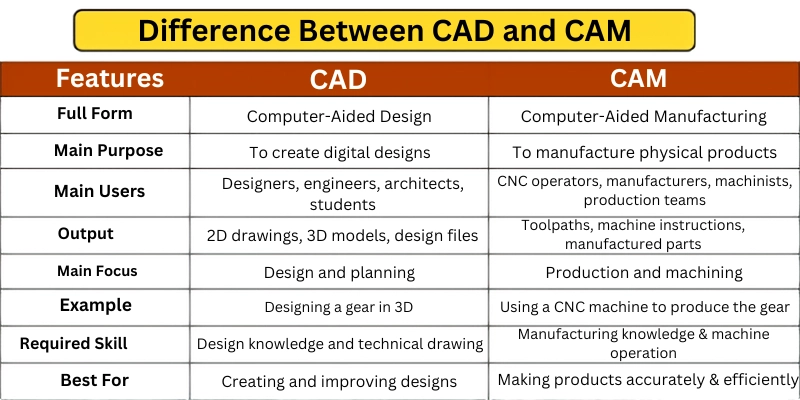
CAD stands for Computer-Aided Design. It is used to create 2D drawings and 3D models of products, buildings, parts, machines, or components.
CAM stands for Computer-Aided Manufacturing. It is used to control manufacturing machines and convert CAD designs into physical products.
So, in CAD vs CAM, CAD is mainly for designing, while CAM is mainly for making.
What Is CAD?
CAD means Computer-Aided Design. It is a technology that helps users create digital designs using computer software. Instead of drawing manually on paper, designers, engineers, architects, and manufacturers use CAD software to prepare accurate drawings and models.
CAD can be used for both 2D and 3D design. A 2D CAD drawing may show the length, width, and layout of a part. A 3D CAD model shows the shape, size, depth, and structure of the object from different angles.
| Example |
|---|
An engineer can use CAD to design a car part before it is manufactured. |
What Is CAM?
CAM means Computer-Aided Manufacturing. It is the use of computer software to help manufacture products through machines. CAM software takes a digital design and converts it into instructions that machines can follow.
These instructions may guide CNC machines, milling machines, lathes, cutters, 3D printers, routers, or other automated manufacturing equipment.
| Example |
|---|
After a designer creates a metal part in CAD software, CAM software can generate toolpaths for a CNC machine. |
CAD vs CAM: Quick Comparison Table
| Feature | CAD | CAM |
|---|---|---|
| Full Form | Computer-Aided Design | Computer-Aided Manufacturing |
| Main Purpose | To create digital designs | To manufacture physical products |
| Main Users | Designers, engineers, architects, students | CNC operators, manufacturers, machinists, production teams |
| Output | 2D drawings, 3D models, design files | Toolpaths, machine instructions, manufactured parts |
| Main Focus | Design and planning | Production and machining |
| Stage in Process | Used before manufacturing | Used after design approval |
| Common Use | Product design, building plans, mechanical parts | CNC machining, 3D printing, cutting, drilling |
| Required Skill | Design knowledge and technical drawing | Manufacturing knowledge and machine operation |
| Example | Designing a gear in 3D | Using a CNC machine to produce the gear |
| Best For | Creating and improving designs | Making products accurately and efficiently |
Key Differences Between CAD and CAM
1. Meaning
The first difference between CAD and CAM is their meaning.
CAD means Computer-Aided Design. It is used to create, edit, analyze, and improve digital drawings or models. CAD is mostly related to the design stage of a project.
CAM means Computer-Aided Manufacturing. It is used to prepare manufacturing instructions for machines. CAM is mostly related to the production stage of a project.
A simple way to understand the difference is this: CAD creates the design, and CAM helps manufacture it.
2. Purpose
The purpose of CAD is to help users design something accurately before it is made. It allows designers to test ideas, change dimensions, check shapes, and improve the design without wasting physical material.
The purpose of CAM is to help users manufacture the final design with accuracy and efficiency. CAM software can generate machine paths, reduce manual errors, and help produce parts with consistent quality.
For example, if a company wants to create a new bicycle frame, CAD will help design the frame. CAM will help manufacture that frame using machines.
3. How It Works
CAD works by allowing the user to create digital drawings or models on a computer. The user can add lines, shapes, curves, dimensions, layers, materials, and 3D features. The final CAD file may include technical details such as measurements, angles, holes, thickness, and assembly information.
CAM works by using the CAD design as input. It reads the digital model and converts it into machine instructions. These instructions may include cutting paths, drilling points, tool movement, speed, depth, and material removal steps.
4. Use Cases
CAD is used in industries where accurate design is important. Common use cases include:
- Mechanical part design
- Architecture and building plans
- Product design
- Automotive design
- Aerospace components
- Electrical layouts
- Furniture design
- Civil engineering drawings
- 3D modeling for prototypes
CAM is used in industries where automated manufacturing is required. Common use cases include:
- CNC machining
- Milling and turning
- Laser cutting
- 3D printing
- Metal fabrication
- Wood routing
- Mold making
- Industrial production
- Tool and die manufacturing
CAD is useful before production, while CAM is useful during production.
5. Cost or Accessibility
CAD tools are generally more accessible for beginners and students because many CAD programs offer educational versions, free trials, or entry-level tools. A beginner can start learning CAD with basic 2D drawing or simple 3D modeling.
CAM can be more complex because it often involves manufacturing machines, materials, tools, and production settings. Even if CAM software is available, users may still need access to CNC machines or 3D printers to use it practically.
For students, CAD is usually easier to start with. For buyers or businesses, CAM becomes important when they want to move from design to real production.
6. Benefits
CAD offers many benefits for design and planning. Main benefits of CAD include:
- Accurate 2D and 3D design
- Easy editing and modification
- Better visualization
- Faster design process
- Improved documentation
- Reduced need for manual drafting
- Useful for testing and design improvement
CAM also offers strong benefits for production. Main benefits of CAM include:
- More accurate manufacturing
- Faster production process
- Better machine control
- Reduced manual errors
- Improved repeatability
- Efficient material use
- Helpful for complex parts
CAD is valuable for creating better designs. CAM is valuable for producing those designs efficiently.
7. Limitations
CAD also has some limitations. It requires software knowledge, design skills, and technical understanding. A person may create a good-looking model, but if the design is not practical for manufacturing, it may still fail during production.
Limitations of CAD include:
- Requires learning and practice
- Design errors can affect production
- Does not manufacture products directly
- Advanced software may be expensive
- Requires technical design knowledge
CAM also has limitations. It requires machine knowledge, manufacturing experience, correct material settings, and safe machine operation. A wrong CAM setup can damage material, tools, or machines.
Limitations of CAM include:
- Requires manufacturing knowledge
- Needs machines and tools
- Setup can be costly
- Incorrect toolpaths can cause production errors
- Not useful without a proper design file
This is why CAD and CAM work best together. CAD helps create the design, and CAM helps produce it correctly.
Examples of CAD and CAM
Here are simple real-life examples to understand the difference between CAD and CAM.
Example 1: Car Part Manufacturing
A mechanical engineer designs a car engine component using CAD software. The design includes size, shape, holes, curves, and exact measurements.
After the design is approved, CAM software creates toolpaths for a CNC machine. The CNC machine then cuts the metal block into the final engine component.
In this example, CAD is used for design, and CAM is used for manufacturing.
Example 2: Furniture Production
A furniture designer uses CAD to create a 3D model of a wooden chair. The design shows the seat, legs, back support, and joining points.
CAM software then prepares cutting instructions for a CNC wood router. The machine cuts the wooden pieces according to the design.
CAD creates the chair design. CAM helps produce the chair parts.
Which One Should You Choose?
Choosing between CAD and CAM depends on your goal.
- Choose CAD if you want to design products, parts, buildings, layouts, or 3D models.
- CAD is best for students, designers, engineers, architects, and beginners.
- Choose CAM if you want to manufacture products using CNC machines, 3D printers, or automated tools.
- CAM is best for manufacturers, machinists, production teams, and businesses.
- Students should learn CAD first, because CAM depends on design files.
- For business use, choose CAD for drawings and concepts, and CAM for in-house production.
- For a complete design-to-production process, use both CAD and CAM together.
Quick Decision Guide
| Your Need | Best Choice |
|---|---|
| I want to create 2D drawings | CAD |
| I want to create 3D models | CAD |
| I want to design a product before production | CAD |
| I want to run CNC machines | CAM |
| I want to manufacture parts from a digital design | CAM |
| I want to 3D print or machine a prototype | CAM after CAD |
| I am a beginner or student | Start with CAD |
| I run a workshop or production unit | CAM is important |
| I want a full product development process | Use both CAD and CAM |
Conclusion
So guys, it’s time to finish up! In this article, we’ve covered the difference between CAD and CAM in detail. CAD is mainly used for designing products on a computer, while CAM is used for manufacturing those designs with machines.
CAD is best for students, designers, and engineers who want to create accurate models.
CAM is better for manufacturers, CNC operators, and workshops that need real production.
You can also read the technology differences on our tech basic category.





- Be Respectful
- Stay Relevant
- Stay Positive
- True Feedback
- Encourage Discussion
- Avoid Spamming
- No Fake News
- Don't Copy-Paste
- No Personal Attacks
- Be Respectful
- Stay Relevant
- Stay Positive
- True Feedback
- Encourage Discussion
- Avoid Spamming
- No Fake News
- Don't Copy-Paste
- No Personal Attacks
