Free AI Tools for HR in 2026 | Secure, Fast & Smart Solutions
Published: 19 May 2026
Today, human resources teams around the world are embracing automation and artificial intelligence to simplify tasks, improve recruiting, enhance employee engagement, and boost productivity. Free AI tools are designed to help HR workers do more without spending a lot of money.
This easy guide will help you find the 10 best free AI tools for HR in 2026. You will learn about each tool’s benefits, key features, and how it can make HR tasks easier and more efficient.
After reading this blog post, you’ll be able to confidently select the finest tool for your HR needs, whether they’re recruitment, performance management, or employee experience.
Why Do HR Teams Look for Free AI Tools?
Human resource workers use a variety of technologies and platforms for recruitment, onboarding, employee communications, performance evaluations, training, and other tasks.
However, teams usually search for free AI technologies because:
- Limited Budget: Not all human resources departments can afford costly IT solutions.
- Efficiency requirements: Manual processes take time and slow down HR operations.
- Better Candidate Experience: AI enables faster and more accurate responses to candidates.
- AI can automate repetitive tasks such as meetings, interviews, scheduling, and paperwork.
- Real-time technologies improve employee engagement by keeping HR personnel linked to their workers.
Because of these reasons, HR professionals are adopting free AI tools that give them smart features without extra cost.
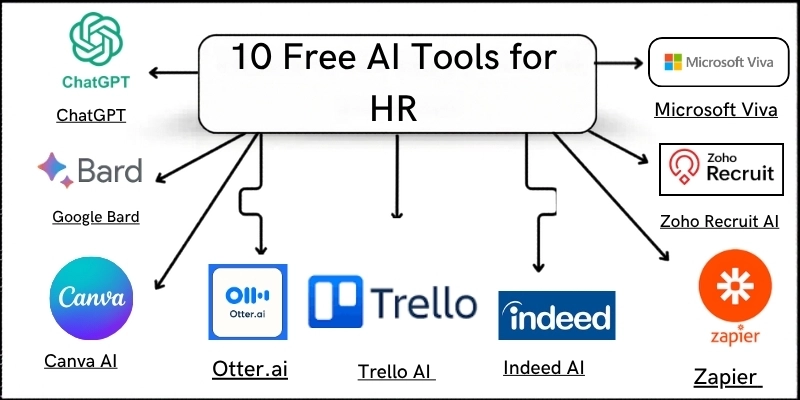
10 Best Free AI Tools for HR in 2026
Based on the latest HR tech trends for 2026, here are the best and most popular free AI tools that help HR teams manage tasks, automate workflows, and improve the employee experience.
1. ChatGPT (Best for HR Assistance & Candidate Conversations)
ChatGPT is an advanced AI language assistant developed by OpenAI that allows HR professionals to automate a wide range of tasks. It saves teams time and improves accuracy by allowing them to develop job descriptions and offer letters, as well as reply to applicant inquiries and generate HR rules.
It is ideal for HR managers and recruiters looking for a flexible, easy-to-use AI tool to streamline communication and documentation across the organization.
Key Features
- Draft job descriptions and offer letters
- Answer FAQs from employees/candidates
- Automate HR emails and responses
- Assist in policy writing and documentation
| Pros |
|---|
|
| Cons |
|---|
|
Pricing (Free & Paid)
ChatGPT provides free access with limited use. Paid subscriptions provide faster replies and more advanced choices.
Why Choose This Tool?
ChatGPT is an excellent free AI solution for HR communications, content authoring, and document preparation.
2. Gemini (Best for Candidate Communication & Idea Generation)
Gemini is an AI-powered conversational assistant developed by Google to provide fast and intelligent responses for various tasks.
HR professionals may use it to speak with applicants, create email content, write FAQs, and come up with ideas for employee engagement campaigns.
This makes it especially valuable for teams that want quick, AI-assisted solutions while still maintaining a professional HR approach.
Key Features
- Easy natural language communication
- Generate responses for candidate questions
- Brainstorm interview questions and scripts
- Draft employee engagement surveys
| Pros |
|---|
|
| Cons |
|---|
|
Pricing (Free & Paid)
Gemini is freely accessible with a Google account. Paid tiers and advanced features vary with Google services.
Why Choose This Tool?
It is great for HR departments seeking an AI conversational assistant that replies immediately and supports applicant and internal messages.
3. Canva AI (Best for HR Graphics & Visual Documents)
Canva AI is a user-friendly design tool that enables HR teams to produce visually appealing content for internal communications, training materials, and recruiting drives.
Its AI-powered features make it easy to create posters, onboarding instructions, and presentation decks without prior design knowledge.
Canva AI is ideal for HR professionals who want professional-grade images quickly and efficiently.
Key Features
- AI‑generated design suggestions
- Templates for HR posters, presentations
- Visual communication tools
- Export in multiple formats
| Pros |
|---|
|
| Cons |
|---|
|
Pricing (Free & Paid)
Canva provides a free version with several features. Pro upgrades provide more designs and AI tools.
Why Choose This Tool?
A great free tool that can help you is Canva AI. It lets you make quick and professional HR graphics for internal communications or training materials.
4. Otter.ai (Best for Interview Transcription & Notes)
A powerful AI tool called Otter.ai can turn talks and interviews into text in real time. It lets HR teams transcribe interviews, take meeting notes, and create searchable files, making much of the paperwork much easier to handle by hand.
It’s a great option for HR workers who need to rapidly and precisely record conversations.
Key Features
- Real‑time transcription
- Easy export and editing
- Searchable transcripts
| Pros |
|---|
|
| Cons |
|---|
|
Pricing (Free & Paid)
Otter.ai offers basic free access. Paid plans give more transcription minutes and features.
Why Choose This Tool?
Otter.ai is perfect for HR teams that need efficient interview transcription and searchable meeting notes.
5. Trello AI (Best for HR Task Automation & Planning)
Trello AI is a project management tool that leverages AI to help HR teams plan tasks, track job openings, and automate processes. Its smart ideas and visual boards make working together as a team and keeping track of tasks easier.
This tool is great for HR workers who want to keep track of projects without doing it by hand and get clear overviews.
Key Features
- Smart task suggestions
- Workflow automation
- Integrations with calendars and apps
| Pros |
|---|
|
| Cons |
|---|
|
Pricing (Free & Paid)
Trello’s free plan comes with simple boards and tools. For a fee, you can get more powerful power-ups.
Why Choose This Tool?
With Trello AI, your HR team can easily see what tasks they need to do and get them done without spending any money.
6. Indeed AI (Best for Free Candidate Screening)
Indeed AI is an intelligent resume screening tool designed to help HR teams efficiently shortlist candidates. It analyses resumes, ranks candidates based on job requirements, and provides automated suggestions for the best matches.
This makes it ideal for recruiters and HR departments that want to reduce manual review time and identify top talent quickly.
Key Features
- Resume parsing and matching
- Candidate fit scoring
- Automated shortlist suggestions
| Pros |
|---|
|
| Cons |
|---|
|
Pricing (Free & Paid)
Indeed AI’s basic screening is free to use with job postings. Premium tools cost extra.
Why Choose This Tool?
If you want free AI resume screening and candidate ranking, Indeed AI helps streamline hiring.
7. Slack GPT (Best for Internal HR Team Messaging)
Slack GPT is an AI-powered messaging helper built into Slack designed to improve team conversation. When employees ask questions, HR teams can automatically answer them, set reminders, and give fast replies within channels.
It is especially useful for HR professionals who want to speed up internal communication and reduce repetitive messaging tasks.
Key Features
- Contextual AI responses
- Automated reminders and responses
- Boost internal communication
| Pros |
|---|
|
| Cons |
|---|
|
Pricing (Free & Paid)
Slack offers a free tier. Slack GPT features vary by plan.
Why Choose This Tool?
For HR teams already using Slack, Slack GPT can speed up internal communication and quick question responses.
8. Microsoft Viva (Best for Employee Engagement & Insights)
Microsoft Viva is an AI-powered employee experience platform that provides insights into engagement, productivity, and workplace sentiment.
HR teams can leverage its analytics dashboards to understand team performance, monitor engagement, and implement targeted improvements.
It is best suited for organizations looking to combine data-driven insights with HR initiatives.
Key Features
- Engagement analytics
- AI‑supported insights
- Actionable dashboards
| Pros |
|---|
|
| Cons |
|---|
Advanced modules require Microsoft 365 |
Pricing (Free & Paid)
Limited free access with Microsoft 365. Paid for advanced analytics.
Why Choose This Tool?
If your company uses Microsoft products, Viva can help HR teams gain data‑driven employee insights.
9. Zoho Recruit AI (Best Free Hiring Assistant)
Zoho Recruit AI is an automated hiring tool that uses AI to quickly match job candidates to open positions. It automatically contacts candidates, reviews resumes, and provides managers with information that helps them make faster hiring decisions.
This tool is great for HR departments that want a smart hiring helper without paying for a premium hiring platform.
Key Features
- Candidate skill matching
- AI job post writing
- Automated follow‑ups
| Pros |
|---|
|
| Cons |
|---|
|
Pricing (Free & Paid)
Zoho Recruit offers a free plan for basic hiring. Paid versions unlock more recruitment automation.
Why Choose This Tool?
Zoho Recruit AI is useful for HR teams that need a free hiring assistant with smart features.
10. Workflow Automation Tools (Best for HR Process Automation)
Workflow Automation Tools such as Make or Zapier allow HR teams to automate repetitive tasks across multiple platforms. These tools make it possible for emails, alerts, and data sync between apps to happen automatically.
They’re great for HR workers who want to improve processes and cut down on time spent on administrative tasks that need to be done by hand.
Key Features
- Automate repetitive tasks
- Integrate multiple apps
- Custom workflows
| Pros |
|---|
|
| Cons |
|---|
|
Pricing (Free & Paid)
Basic automation workflows in free plan. Paid unlocks more tasks.
Why Choose This Tool?
Use workflow automation tools to connect HR apps and save hours of repetitive work.
Free AI Tools for HR Comparison Table
Here is a quick comparison of the AI tools for HR professionals, beginners and advanced users.
| Tool Name | Best For | Free Tier | Main Strength |
|---|---|---|---|
| ChatGPT | HR writing & responses | ✓ | Conversational AI |
| Gemini | Candidate messaging | ✓ | Fast idea generation |
| Canva AI | HR designs | ✓ | Visual content creation |
| Otter.ai | Interview transcriptions | ✓ | Speech‑to‑text accuracy |
| Trello AI | Task planning | ✓ | Workflow automation |
| Indeed AI | Resume screening | ✓ | Candidate ranking |
| Slack GPT | Internal HR chats | ✓ | Team communication |
| Microsoft Viva | Engagement insights | Limited | Employee analytics |
| Zoho Recruit AI | Hiring automation | ✓ | Candidate matching |
| Workflow Automation Tools | HR automation | ✓ | Task automation |
Conclusion
So guys, it’s time to finish up! In this article, we’ve covered the best free AI tools for HR that can help you automate tasks, improve hiring, engage employees, and save valuable time in 2026.
If I personally recommend one, ChatGPT is the best starting point because it’s adjustable, easy to use, and great for communication and writing tasks.
But if you are only interested in screening candidates, tools like Indeed AI or Zoho Recruit AI might be better suited. It’s now your turn! Choose the tool that best suits your HR needs and start improving your work right away.
Frequently Asked Questions
ChatGPT and Canva AI offer some of the most versatile free features for HR teams.
Yes, most popular AI tools are secure, but always verify privacy policies before uploading sensitive data.
Yes, tools like Trello AI and Workflow Automation Tools are especially good for onboarding automation.
AI complements HR work by saving time and reducing repetitive tasks, but human oversight remains important.
- Be Respectful
- Stay Relevant
- Stay Positive
- True Feedback
- Encourage Discussion
- Avoid Spamming
- No Fake News
- Don't Copy-Paste
- No Personal Attacks
- Be Respectful
- Stay Relevant
- Stay Positive
- True Feedback
- Encourage Discussion
- Avoid Spamming
- No Fake News
- Don't Copy-Paste
- No Personal Attacks
